Sending SMS notifications using an Alpha tag
BookItLive allows you to set an SMS Sender ID (SMS sender name) instead of sending the message from an anonymous number.
Registered SMS Sender IDs are crucial in ensuring your business is not flagged as a potentially fraudulent scam activity.
SMS Sender IDs serve several functions:
- Business recognition: Maintain brand presence through continued and effective SMS communications.
- Customer trust: Recognisable SMS Sender IDs can lead to increased customer trust. Customers are more likely to be interact with familiar senders.
- Scam Prevention: By registering a SMS Sender ID, SMS service providers can combat scam messages, making SMS communications more secure for the business and customer.
Following changes to the regulation of SMS Sender IDs in Australia from 1 July 2026, BookItLive has restricted access to Providers setting and modifying SMS Sender IDs in order to minimise the regulatory risk of using any unregistered SMS Sender IDs being used to send out SMS Notifications.
As a business user of BookItLive, you will still be able to view your current SMS Sender ID from the Notification Settings page but will not be able to change its value as previously done.
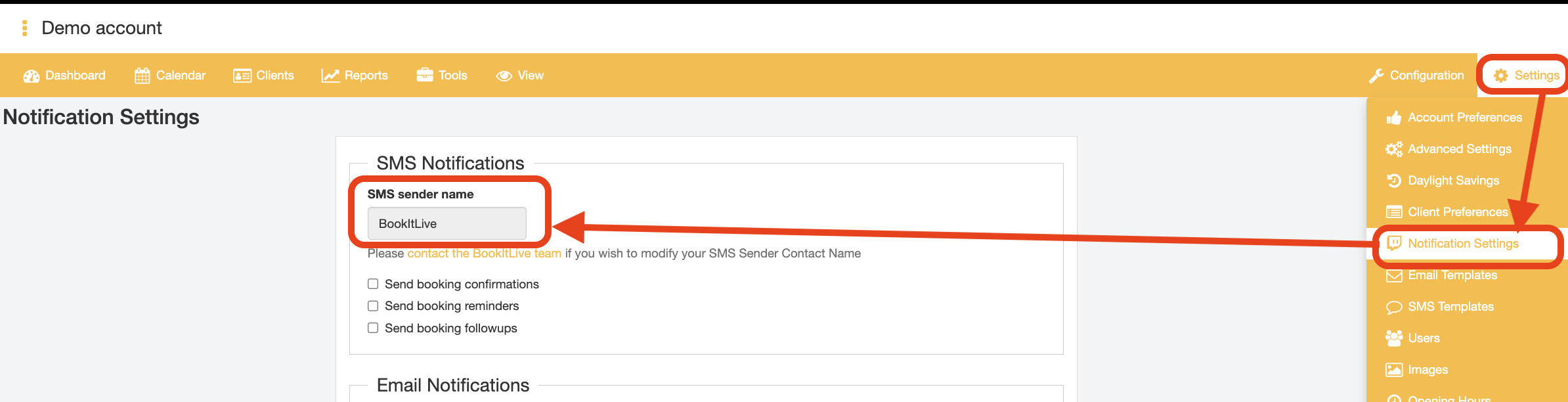
If you wish to add or modify your business's SMS Sender ID, you will now need to contact BookItLive administrators and they will perform the necessary checks in order to validate that the requested SMS Sender ID is fit for use.
BookItLive is an approved participating telco of the SMS Sender ID Register, which gives BookItLive the authority to register SMS Sender IDs on behalf of its business clients as an Originating Telecommunications Provider.
For more information, please visit our SMS Sender ID registration page.
Note: You need to have enough SMS credits to cater for the number of SMS messages that will be sent. SMS credits can be purchased using the card linked to your account from the Settings > Purchase SMS credits page.
Note: Not all countries support SMS Sender Names/IDs.
Scam Prevention
As part of protecting consumers from scam activity and scam prevention, the Australian Communications and Media Authority (ACMA) requires all businesses to register their SMS Sender IDs.
Business using SMS Sender IDs must prove that they have a valid use case for using that Sender ID. Valid use cases of acceptable SMS Sender IDs include:
- The full business name of your entity.
- An acronym, initialism, or contraction of your entity.
- Additional phrasing that relates to the entities function, location, or purpose.
Additionally, there are criteria that businesses must comply with regarding selection of the SMS Sender ID value that they wish to register and use:
Sender IDs must:
- be 2 to 11 characters long
- include only characters 32–126 from the American Standard Code for Information Interchange(ASCII) decimal codes.
- ASCII can be accessed free of charge at ascii-code.com
- not solely consist of ‘restricted’ words published on the ACMA’s website
- not consist only of numbers
- not contain a space or underscore at the beginning or end
- not contain the word ‘Unverified’
- not be offensive, deceptive, or misleading
- have a valid use case (e.g., it must match your registered business name, company name, trademark, or domain name – see next section for more information)
Please note: sender IDs are case-insensitive (e.g., 'ACMA' is the same as 'acma').
How to Register SMS Sender Names/IDs
All SMS Sender IDs must be registered with the ACMA. The registration process is:
- Contact the BookItLive support team to propose a new SMS Sender ID to use for sending out SMS Notification
- BookItLive will request the following information from your organisation in order to perform the necessary business identification verification checks:
- Your business’ valid ABN
- Your business’ head office street address, including:
- Street number and name
- Suburb
- Postcode
- Your business’ official website
- Your business’ (generic) telephone number (not tied to an individual of the business)
- Your desired SMS Sender ID
- Your business entity's authorised contact first name
- Your business entity's authorised contact last name
- Your business entity's authorised contact email address
- Your business entity's authorised contact direct (mobile) phone number (tied to the designated business entity authorised contact individual)
- BookItLive will submit the business information provided in order to request the SMS Sender ID to be added to the ACMA SMS Sender ID Register via its ACMA Assist portal account.
- After BookItLive has submitted a Registration request for your SMS Sender ID, the ACMA will send out an email to invite the authorised contact of the business (whose details were provided in step 2.6 - 2.9) to create an ACMA Assist account and subsequently approve the SMS Sender ID requested from step 2.5).
- During this step, the ACMA may review the SMS Sender ID registered for your business entity if it believes that the valid use case for your SMS Sender ID requested is inadequately compelling.
- After the authorised contact of your business has given the approval for the requested SMS Sender ID, the Sender ID in question will be sent to the SMS Sender ID Register pending full approval for use. This will typically take 24 hours to process.
- Following the 24 hour cooldown from step 5 above, both your business' authorised contact and BookItLive will receive an email notification from the ACMA informing that the requested SMS Sender ID has been fully approved and is ready for use.
- BookitLive will then add/modify your SMS Sender ID in the BookItLive system, which will then send SMS notifications to your customers using your registered SMS Sender ID.
- End.
Was this article helpful?
That’s Great!
Thank you for your feedback
Sorry! We couldn't be helpful
Thank you for your feedback
Feedback sent
We appreciate your effort and will try to fix the article