bookitlive allows you to send bulk emails or SMS's to your client list to allow you to communicate news or other information.
From your client page you can filter which clients you want to select based on simple or advanced filters. Using advanced filters you can also select the clients that have opted in to receiving newsletters and special offers (excludes clients that have not selected to receive newsletters and special offers)
Changing an individual client setting you can deselect a client from receive newsletters and special offers if a client wants to opt out.
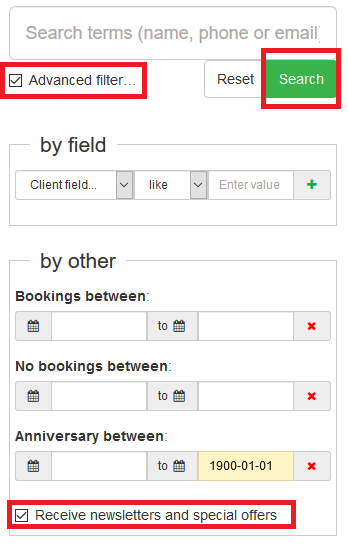
Selecting advanced filters to only select clients that want to receive newsletters and special offers
- Select the Clients tab from the dashboard
- Select Advanced filter
- Select the tickbox for Receive newsletters and special offers
- Select search
- The client list is now filtered on clients that have the receive newsletters and special offers selected under the clients settings
- Select all the client listed to send out a bulk email or SMS
Was this article helpful?
That’s Great!
Thank you for your feedback
Sorry! We couldn't be helpful
Thank you for your feedback
Feedback sent
We appreciate your effort and will try to fix the article