
Configuration > Categories
Categories allow you to group your Services and Promotion together. Categories are used on your Mini Website page to allow clients to easily find and book services or purchase products, promotions, bulk packages and vouchers.
For example, a fitness studio might have different categories for dance classes, yoga classes, spinning classes, and other categories for purchasing products for bulk class session passes or memberships.
A driving school might have different categories for Initial (Beginner) lessons and ongoing (intermediate/advanced) lessons and other categories for purchasing products for bulk lesson packages and special promotions.
Adding Categories to your bookitlive account
- Login to bookitlive
- Select Configuration > Categories
- Select Add Another Category

- Enter a name for the Category
- Select the Services and Products that you want to link to that Category name.
Services and Products can only be linked to a single Category.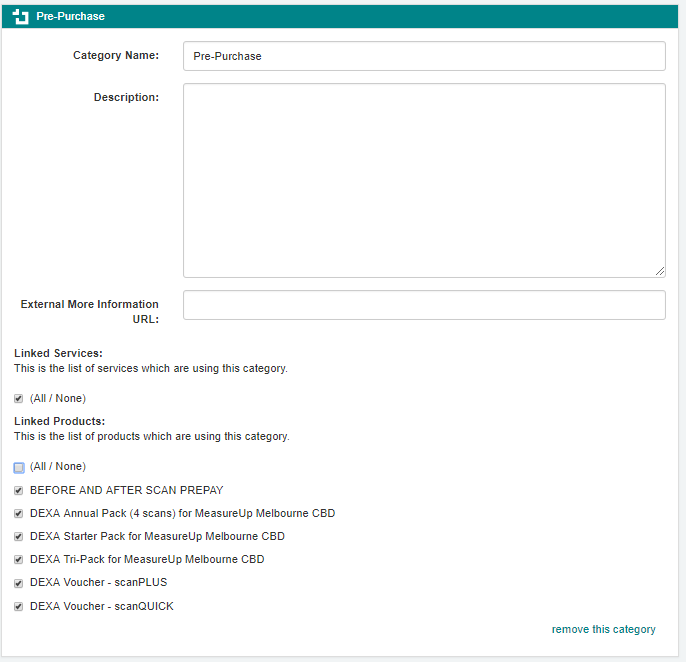
- Select Save.
Adjusting the Category display order
The Category display order can be adjusted to set the order Categories appear on the Mini Website. This allows you to set the list order that best suits your business needs by placing Categories with Products and Services you want to sell higher in the sort order.
- Login to bookitlive
- Select Configuration > Categories
- Select Adjust Display order
- Use your mouse to select and drag the Category to the order you want
- Select Save Display Order
Was this article helpful?
That’s Great!
Thank you for your feedback
Sorry! We couldn't be helpful
Thank you for your feedback
Feedback sent
We appreciate your effort and will try to fix the article