Why do you need to clear your saved passwords?
If you have a password saved on your iPhone or iPad that is no longer valid it can cause your bookitlive logon to be locked due to using the wrong password to access your account. It is the same as if you were attempting to logon with an incorrect password on multiple attempts. The incorrect saved password needs to be deleted to stop this from happening.
Clearing saved passwords on iPhone / iPad
If a browser refresh does not resolve the problem, force clear the browser cache and history.
- From your home screen select Settings
- Select Safari
- Select Password (your will need to use your touch ID or passcode to access this area)
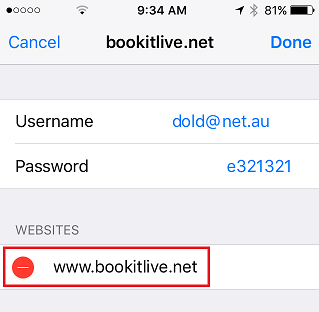
- Select the password for bookitlive.net from the list
- Select Edit
- Select Delete

Was this article helpful?
That’s Great!
Thank you for your feedback
Sorry! We couldn't be helpful
Thank you for your feedback
Feedback sent
We appreciate your effort and will try to fix the article