Use the client page to export client data to a spreadsheet format (.csv) to use in Microsoft Excel or Apples Numbers.
To export all of your client data:
- Select Clients tab.
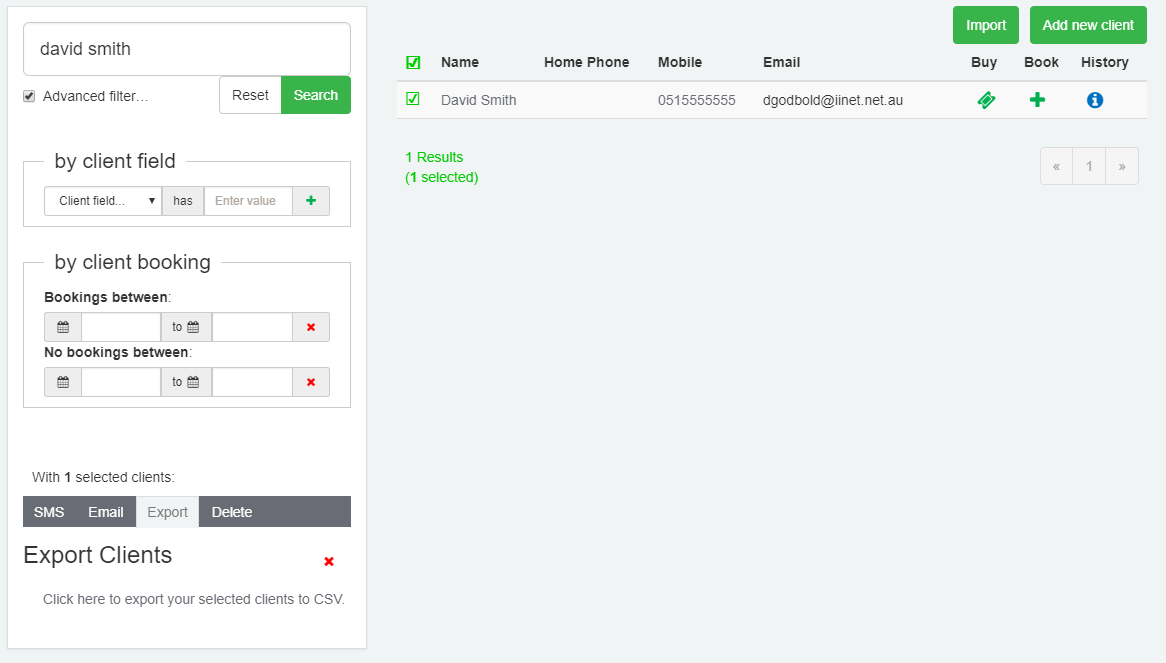
- Use search to select the client to export. By default, all clients are deselected when the Client page opens
- Users can select the tickbox next to the Name column to select all listed Client records.
- Select the Export tab.
- Select "Click here to export your selected clients to CSV". The client details will be downloaded.
- Open the file in Microsoft Excel or Apple Numbers to confirm client details.
Was this article helpful?
That’s Great!
Thank you for your feedback
Sorry! We couldn't be helpful
Thank you for your feedback
Feedback sent
We appreciate your effort and will try to fix the article