All bookitlive services can be configured as a single participant 1 on 1 session or a multiple participant service group session. A service can be changed at any time from a 1 on 1 session to a group session by changing the group booking settings.
The configuration tab is used to configure a service for group sessions.
Configuration > Services
- Select the service and open
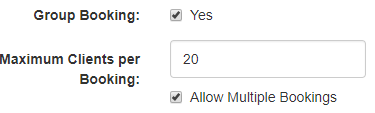
- Select Group Booking

-
Set the maximum clients per booking
-
If you want to let clients make multiple booking set Allow Multiple Bookings to yes
Was this article helpful?
That’s Great!
Thank you for your feedback
Sorry! We couldn't be helpful
Thank you for your feedback
Feedback sent
We appreciate your effort and will try to fix the article