Use the bookitlive Voucher Reporting tool to find out the usage details of a Voucher Code.
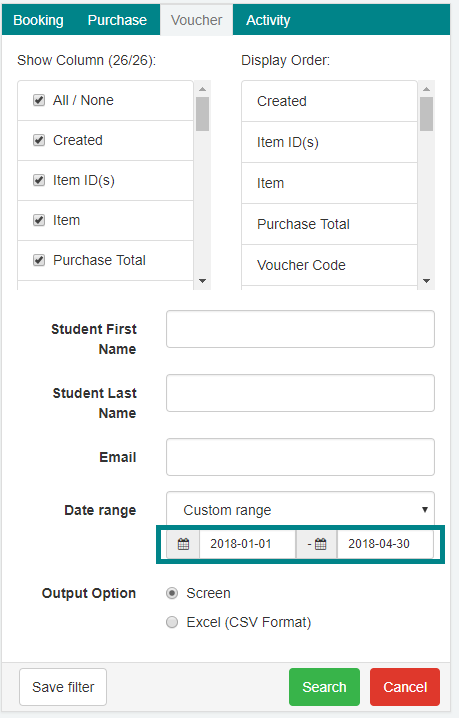
- Select the Reports tab.
- Select Voucher Tab.
- Select a Custom Range.
- Select a Start date
- The selected Start Date needs to be broad enough to cover when the Voucher was first used.
- Select an End date.
- The selected End Date needs to be broad enough to cover when the voucher was most-recently used.
- Select an Output option Screen or Excel.
- The Screen option will display the Report results on the web-browser page directly
- The Excel option will display the results by downloading a .csv file that can be viewed in Microsoft Excel or Apple Numbers.
- Select Search.
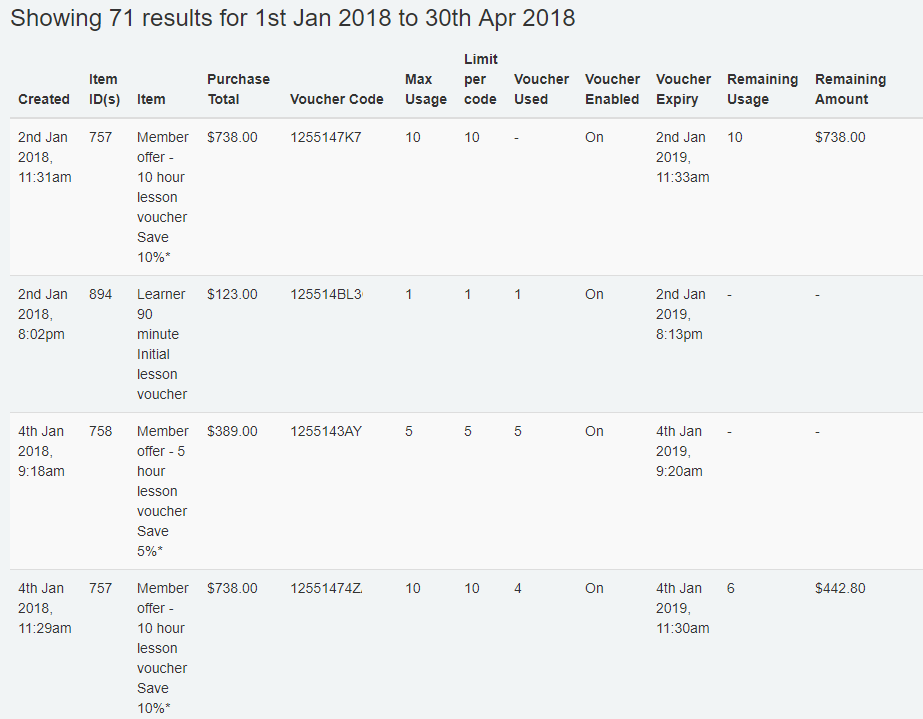
The output will list the voucher usage details:
Was this article helpful?
That’s Great!
Thank you for your feedback
Sorry! We couldn't be helpful
Thank you for your feedback
Feedback sent
We appreciate your effort and will try to fix the article