bookitlive provides the functionality to manually create Voucher Codes that can be used when making a Booking instead of payment. Manually created voucher codes ("Custom Static" Vouchers) are generally used when the Vouchers/session passes/packages are sold outside of the bookitlive software.
For example: A business does a deal for a large corporation where the business provides driving lessons at a discounted rate. The business invoices the corporation for the total amount but wants the students to book online themselves using a Voucher Code.
Manually creating a Voucher Code
- Login to bookitlive.
- Select Settings > Voucher Codes.
- Select Voucher type "Custom (Static)".
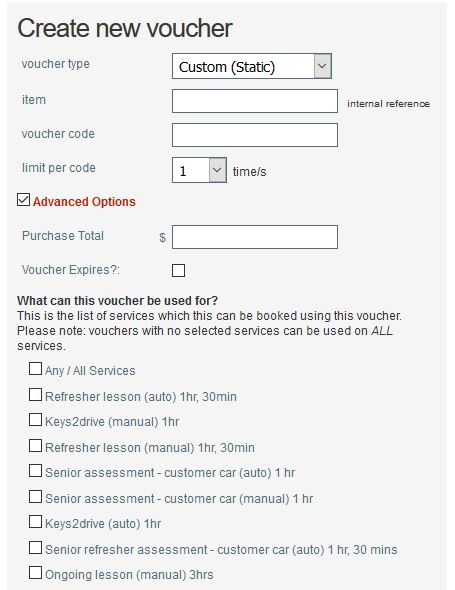
- Enter an Item description for your reference, e.g. the person's name that the vouchers are assigned to.
- Enter the Voucher Code you want to use. This is the exact string of characters that the booking Client would input during the payment process
Note: All voucher codes must be unique. - Select the number of times this Voucher Code can be used.
- Enter a Voucher Purchase Total amount. This is the cost that the Voucher is sold for.
- Select a Date when the Voucher Code expires.
- Select which Services the voucher code can be used for.
- Save the Voucher Code by clicking the "Add voucher code" button.
Once the Voucher Code is created, make sure your Services are configured to accept the applicable Voucher Code(s).
Setting a Service to accept Voucher Codes
- Login to bookitlive
- Select Configuration > "Services".
- Open the Service you want to accept Voucher Codes
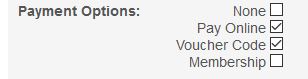
- Select Voucher Code as a payment option
- Save.
Was this article helpful?
That’s Great!
Thank you for your feedback
Sorry! We couldn't be helpful
Thank you for your feedback
Feedback sent
We appreciate your effort and will try to fix the article