The Booking Status is used to indicate the status of the booking and can be used to record attendance (completed), non-attendance (did not show), or to record other statuses that your business needs.
Booking Status Indicator set automatically
When a booking is added it is automatically set to a booking status of ‘Scheduled’.
Modifying Booking Status Indicator
The Booking Status can be manually changed at any time for both future and past bookings through the ‘Modify’ booking function.
- From your dashboard or from the calendar select the "Modify Booking" icon (
 ).
). - Change the booking status.
- Select Save.
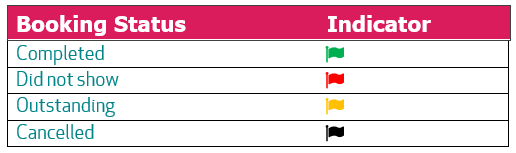
The Booking Status can be changed to one of the following:
Reports
The Booking Status is recorded against the booking, allowing bookings tagged with specific Statuses to be selected as a field when producing reports. The data can also be exported to an Excel (CSV file format) from the Reports page.
Was this article helpful?
That’s Great!
Thank you for your feedback
Sorry! We couldn't be helpful
Thank you for your feedback
Feedback sent
We appreciate your effort and will try to fix the article