Configuring split resource times
bookitlive provides the functionality to define split resource schedules to allow for fixes start time and defined breaks. Time splits are only used for fixed recurring schedules.
- Logged in as a business Admin or Manager
- Select Configuration tab
- Select Resources (if you have changes the terminology for Resources this item will use your terminology)
- Open the Resource that needs to be configured
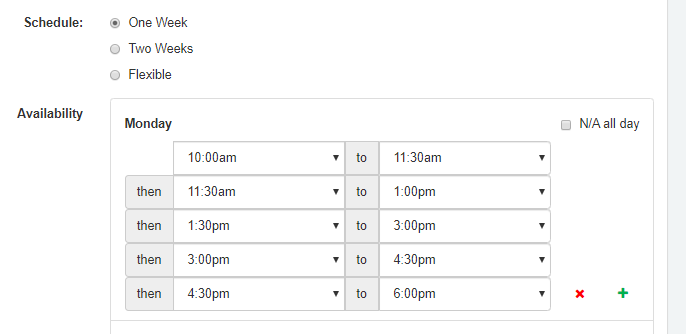
- For any particular day set the start and end time of the first time split
- Use the green plus button to add the next split
- Set the start and end time of the next time split
- Add an additional time splits
- Select Save
Was this article helpful?
That’s Great!
Thank you for your feedback
Sorry! We couldn't be helpful
Thank you for your feedback
Feedback sent
We appreciate your effort and will try to fix the article